

 Ivan
IvanThe problem: A spine clinic needed a brand and a website for a fixed $2,500, and its visitors range from scared patients to surgeons who notice every anatomical mistake.
The fix: A logo built on a metaphor instead of bones, a homepage that answers a patient’s questions in order, a second-opinion page that explains a hard process in three steps, and a budget we stated up front and reopened the moment the scope changed.
In short: Medical practice website design on a fixed $2,500 budget means pricing the scope, answering a patient’s questions in order, and saying so in the same week when the scope moves. All the designs were approved by December 31, and the client said again how great everything looked.
- Client
- Joe Consedine
- Dates
- Oct 2024 to early 2025
- Budget
- Premium
- Spent
- $2,500 fixed
- Done in
- 72 days to approved designs
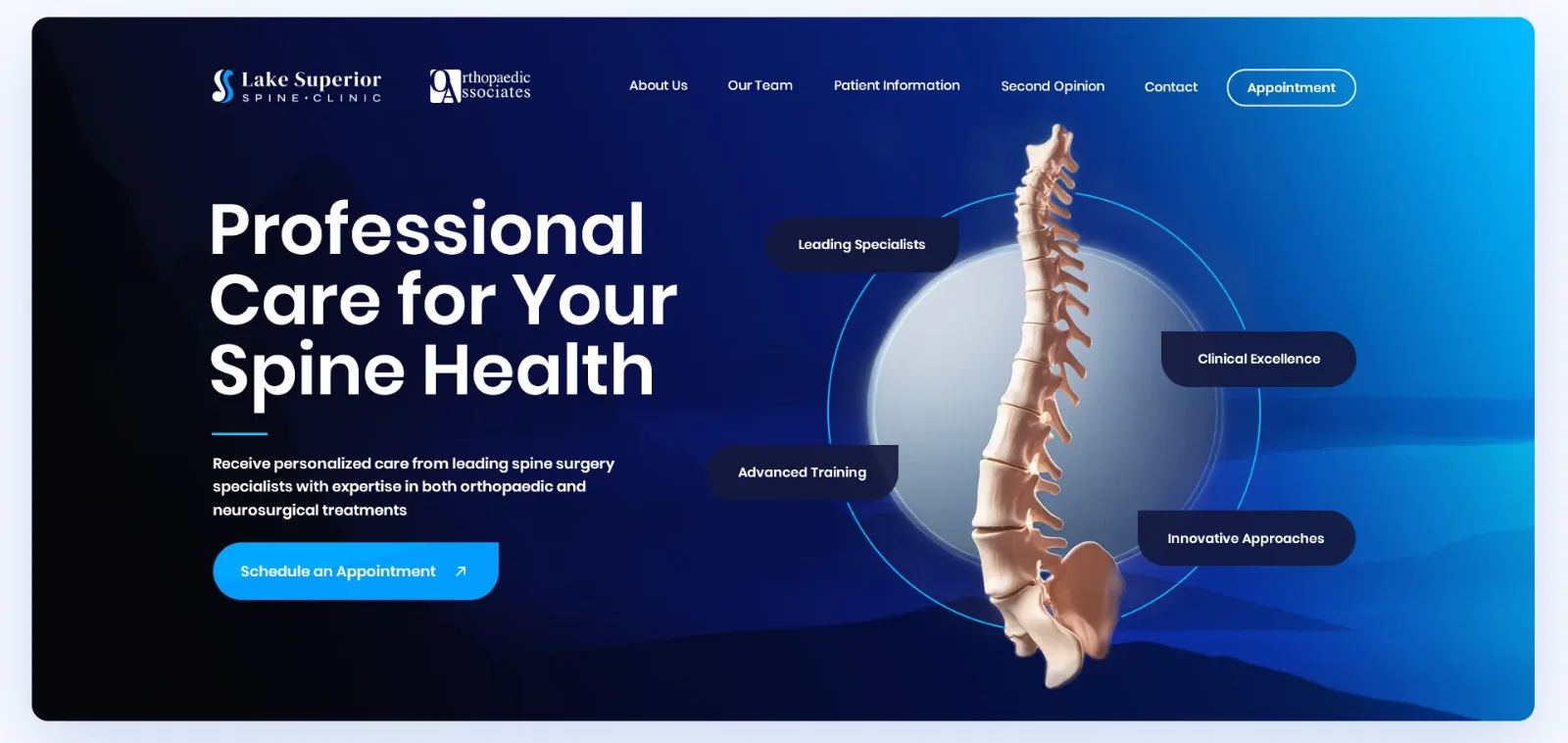
This is a medical practice website design case study from October 2024 to early 2025, for Lake Superior Spine Clinic in Duluth, Minnesota. We worked with Joe Consedine, who managed the project for the clinic and its surgeons. The brief covered branding, the homepage and four more pages, designed first and built in Webflow after approval.
Contents
Medical Practice Website Logo: Why We Avoided Bones
Clinics near this one wear the same logo: a spine here, a tooth there, drawn in a hurry. We wanted to escape that. Joe sent the branding outline on October 20, and our concepts followed on November 1.
We avoided bones on purpose. A literal vertebra in a logo looks like student work from the 1990s, and the great brands never draw their own parts: Microsoft does not put a motherboard in its logo and Apple does not put a hard drive in its own. So we used metaphors the clinic can own. The shape of a spine as an S curve. A circle that reads as a lake seen from above, because the clinic sits by Lake Superior. A sunny day, and a calm symbol for health. Quick AI visualizations of our pencil sketches went to Joe, as sketches only, so he could see the direction. None of them went into the final work.
The clinic’s own logo was part of the header too. Joe asked for the Orthopaedic Associates of Duluth logo to sit beside the new one, the way another spine site he liked shows its partner’s logo. On the day the brand board arrived, November 24, he passed on the client’s wish for a firmer font, and we reopened the type.
Medical Practice Website Budget: $2,500, and What Happened When the Font Changed
The fixed number was set on day one. Joe told us $2,500 was the most he was authorized to spend for the client, and asked us to confirm that the deliverables we had discussed still fit it. We confirmed, and designed to that number.
The first breach was small and honest. By December 6 the initial work was done inside the $2,500, including one page adapted to the new font. But the font change had to reach every page, and mobile was not in the plan. We asked whether he would extend the budget, and four days later we sent a breakdown: 2 to 3 hours for the font on four pages, up to 8 hours for mobile layouts of five pages, and 14 to 20 hours to build five pages in Webflow, at 2.5 to 4 hours for a simple page and 4 to 6 for the complex homepage.
Joe had the client’s green light on December 14, and by December 31 all the designs were approved. Our rule is simple: price the scope, and when the scope moves, say so in the same week.
Medical Website Homepage Design: Answering a Patient’s Questions in Order
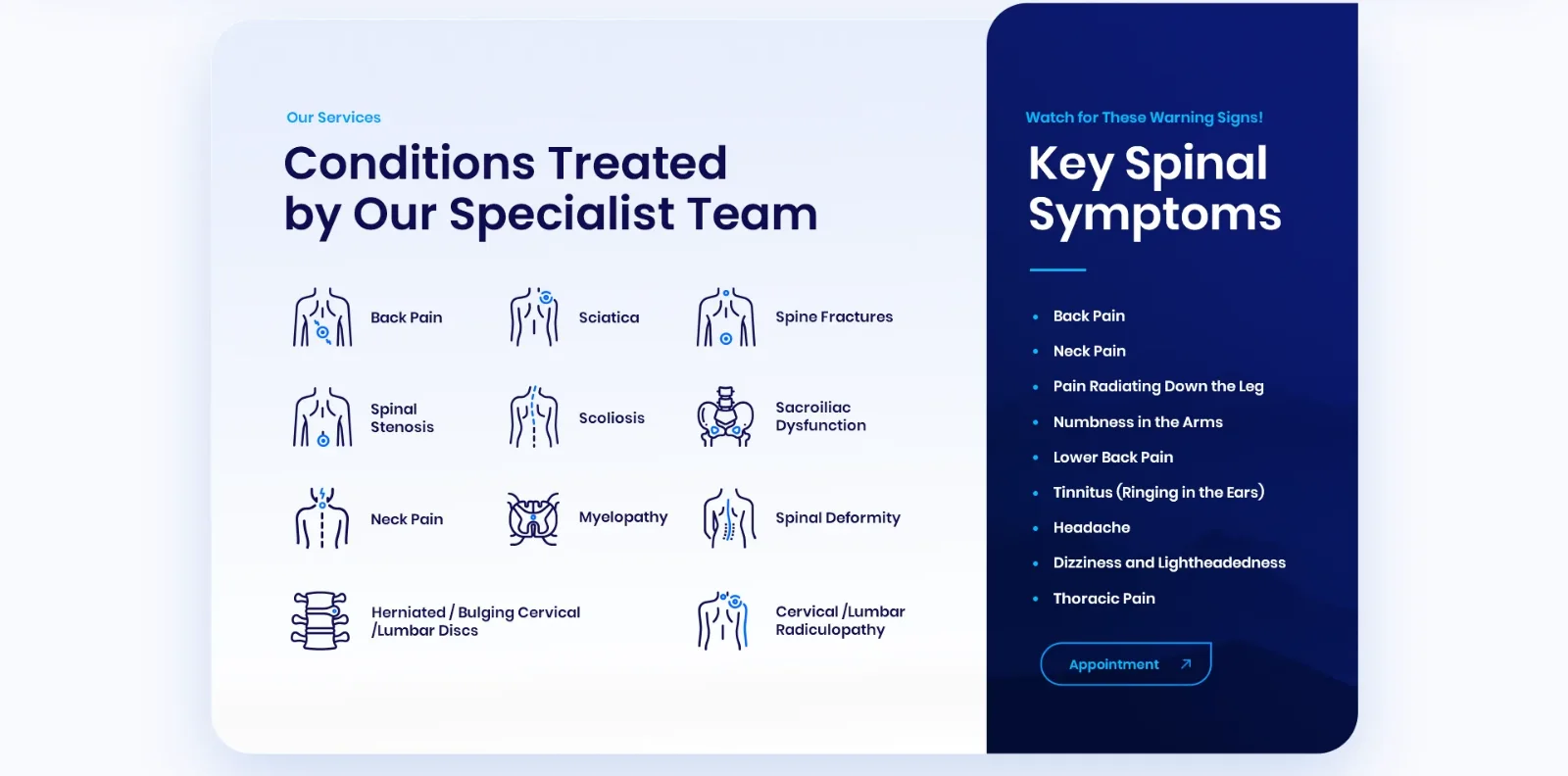
The homepage follows the questions a patient asks. Who are you? The hero says “Professional Care for Your Spine Health” and gives one button, Schedule an Appointment. What do you treat? A section of conditions with a custom icon each. What should worry me? A dark card of warning signs sits beside it, from back and neck pain to numbness in the arms, dizziness and pain that radiates down the leg.
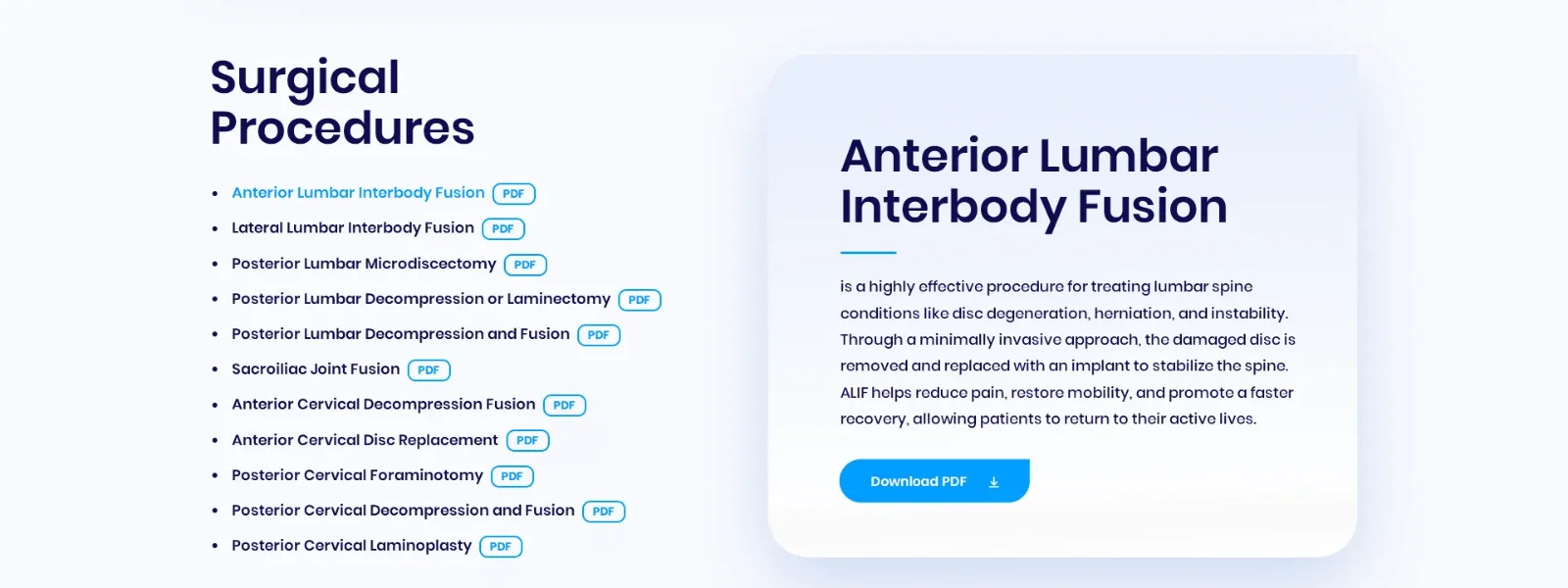
The surgeon’s world sits below. The clinic gave us its surgical information packets, and the page lists eleven procedures with a PDF tag next to each. The selected procedure gets a card with a short description and a download button. A patient can read a paragraph, and anyone who wants the detail can take the full packet.
We also got the anatomy wrong first. The first spine image was a simplified, friendly version, meant not to scare parents. Then we realized that the doctors who judge a clinic’s website would laugh at it, because they expect the whole spine drawn the way it really is. We rebuilt it from scratch as a full spine and swapped the images that used it.
Second Opinion Page Design: Explaining a Process in Three Steps
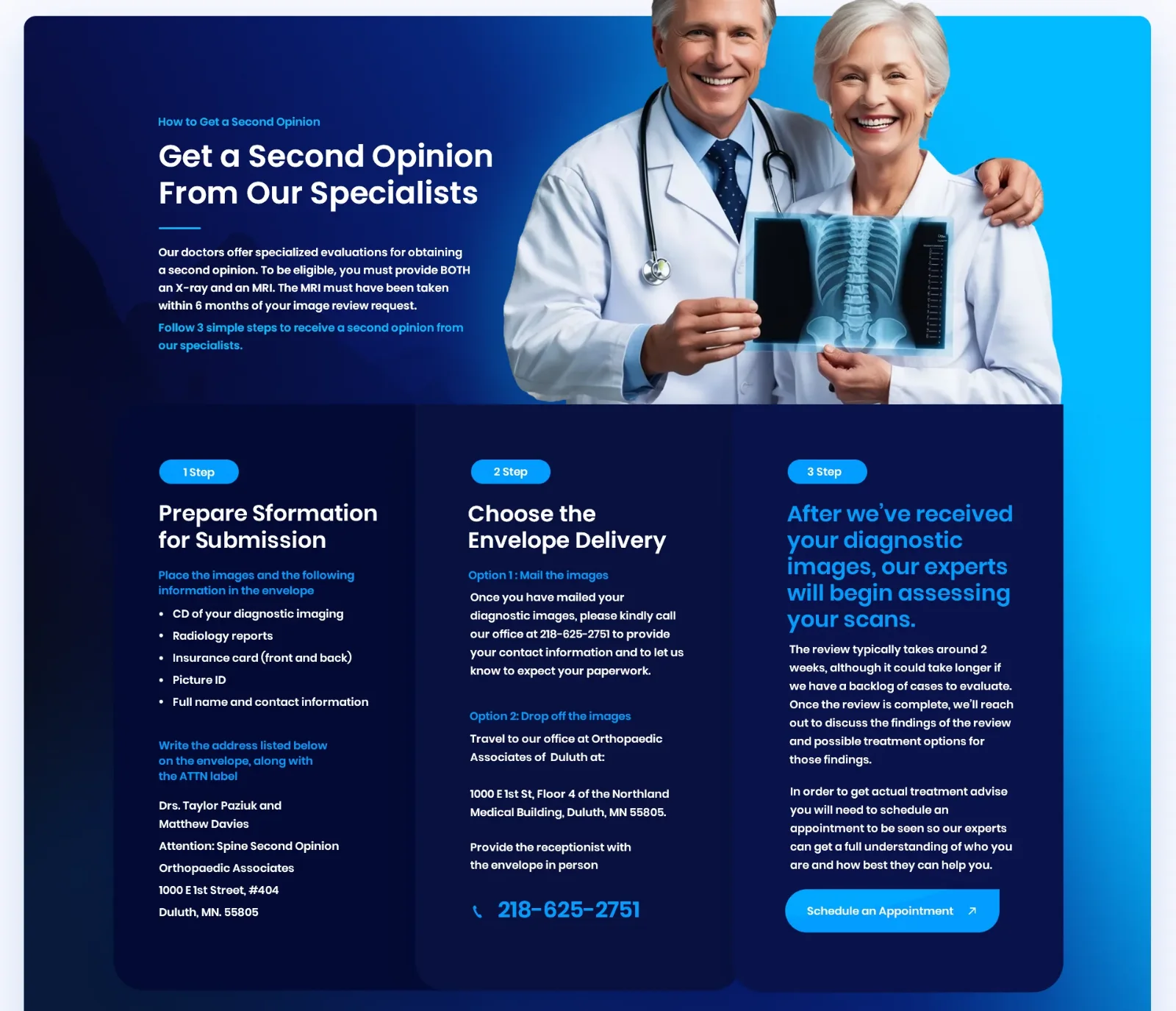
The page that matters most to the clinic explains how to get a second opinion, and the process is not simple. To be eligible, a patient must send both an X-ray and an MRI, and the MRI has to be less than six months old. The patient prepares a package, delivers it by mail or in person, and waits for a review that takes about two weeks. Only after that can the patient book an appointment.
We turned that into three numbered cards, one per step, on a dark band so the section stands out from the white page. Step one is a checklist of what goes in the envelope. Step two gives the two delivery options with the clinic’s address and phone number. Step three says what happens next and ends on the appointment button.
Medical Practice Website Build in Webflow: A Plugin, Messy Classes and a Bug List
We built the pages in Webflow with the Figma-to-Webflow plugin. It is fast, and it leaves messy CSS class names, which does not matter on a page that rarely changes. Later we cleaned the classes anyway and added three more breakpoints, so the client could tune small and large screens.
Joe tested every page on his own phone, and he found real problems. The page jumped in width while loading. The Orthopaedic Associates logo looked too dark on mobile. Sections did not appear as the visitor scrolled, and the appointment button covered the spine graphic at the top of the page. Our own checks passed on desktop and on a Samsung phone, which is a good reason not to trust your own devices. Then we found the cause on another browser: an overflow rule that did not work as expected. We also removed the subtle fade-in animations altogether.
The mobile question deserved a number. Joe could not tell us the traffic split, so we gave him our usual one for sites like this: 70 to 90% mobile, 5 to 25% desktop at full size, tablets about 1%. He answered that the site should be largely mobile, and that the real disconnect was how it behaved across desktop widths. That was fair, and it led to the extra breakpoints.
We also added a contact page that was not in the scope, because the site needed one. And we logged about 2 hours for a fix list that took more than 10. That helps nobody, because the next estimate is then too low. Late in the project Joe decided to build the circle section around the spine himself, so we sent him the PSDs and the separate files: the blue backgrounds, the circles and the spine. One more lesson came from that handoff: we had squeezed an image from 1 MB to about 200 KB, and it came out slightly blurry. We rebuilt it larger and crisper.
What Joe Said About the Work
The client’s reaction came in throughout. Joe wrote “Beautiful work, as always” in the middle of the branding round, and on December 31 he reported that the client again said how great everything looked.
What went well: a logo concept the clinic could own, a homepage that follows a patient’s questions, a second-opinion page that explains a hard process in three steps, and all the designs approved by December 31.
Tips From This Project
Use these on your own medical practice website:
- State the budget and confirm the deliverables against it on day one.
- When the scope moves, say so in the same week, with hours.
- Use metaphors in a medical logo, not bones.
- Order the homepage by the questions a patient asks.
- Explain a complex process in three numbered steps.
- Test on real phones, and log the real hours.
Planning a Medical Practice Website?
Ask us about your medical practice website. Clinics, specialist practices and medical startups share the same two audiences, patients who want reassurance and professionals who want precision. If that is your site, we will look at what you have and tell you what we would change first. You can also see what a project like this costs before you write to us.
Read next
HIPAA-Compliant Website Design: What We Changed on LuxSci’s Homepage. A healthcare-adjacent redesign: compliance copy, calls to action and a five-year relationship.
Comparison Website UX Redesign: CDNfinder Case Study. Heatmaps, provider cards and a quote page for a marketplace that cannot show prices.
Wellingham Financial: healthcare branding and website. Patient payment plans for medical expenses.
Beauty & Melody: salon website design. UX/UI and responsive web design for a celebrity salon.