

 Ivan
IvanThe problem: CDNfinder listed 35 CDN providers on one crowded page, the purchase form was long, the page loaded slowly, and almost nobody clicked the provider cards below the first screen.
The fix: Analytics and session recordings before any layout, then a homepage that works like a tool (filters first, short cards, vector graphics) and a separate quote page for the providers whose prices cannot be public.
In short: A comparison website UX redesign starts with data, not layout. Our audit found a page that took more than 12 seconds to load and heatmaps showing that nobody scrolled to the provider cards, and the client sent a new offer on the day the contract closed.
- Client
- Bart Pluskota
- Site
- cdnfinder.com
- Dates
- Mar 14 to May 9, 2018
- Budget
- Premium and beyond
- Spent
- $11,900
- Client rating
- ★★★★★ 5.0: “You Get much more than what you pay for!”

This is a comparison website UX redesign case study from March to May 2018. We worked for Bart Pluskota, who ran CDNfinder at Zerouno, on the visual design, the illustrations and the landing pages of a platform where companies discover, compare and buy CDN services. Bart’s own developers built it, and we coached them on the design files.
Contents
Comparison Website Audit First: A Slow Page, a Long Form and Two Missing Tools
Our first message was a list of questions, not a mockup. Does the purchase page really need that many form fields? Why does the page download so slowly? We also said the page was too crowded for the 8 to 15 seconds a casual visitor gives it. Bart’s answer on the form was practical: the fields were compulsory because the purchase flow ran on WHMCS, and customizing it would cost them the system’s updates.
He wanted more purchases of CDN plans, more requests for CDN assessments, and information that was easier to read. The contract allowed up to 10 hours a week. Our first estimate was 20 hours or more, about $2,000 at today’s $100 an hour, and a few months before A/B tests would say anything, longer with little traffic. With small traffic we suggested bold tests: three buttons for two weeks, one button for the next two.
Before drawing anything we asked for two tools, Hotjar and Google Analytics access. Our reason, in the chat: “those are my eyes, without them we have just ideas, not data”.
Comparison Website Heatmap Findings: Nobody Scrolled to the Provider Cards
Within hours the data was uncomfortable. Direct traffic was poor quality. Organic visitors bounced, and so did returning visitors, which pointed at the page and its message and not at the traffic source. After only 39 recorded events (a small sample, and we said so) the heatmap already showed that nobody clicked the cards below the first screen. A week later the pattern held: nearly all interactions happened in the first screen, a few at the footer, and almost nobody touched Compare.
The recordings themselves were useless. A particle animation drawn on a canvas in the header turned them into white screens. We asked the developer to comment out the canvas, a small change, because an animation that blocks your own recordings has to go.
Speed was the other finding. In our note to the developer we wrote that the page we were replacing took more than 12 seconds to load, that Google wants 3 to 5 at most, and that 2 is the target.
Comparison Page Design: A Service Page Instead of a Landing Page
Our first concept dropped the landing page altogether. The homepage opened straight on filters, the way Google’s own products do. How it works moved into a video popup. A three-way slider asked visitors to pick two of price, quality and speed. For technical visitors the most requested features sat as clickable tags. Bart wrote back that we were “off to a great start”, and his team’s feedback was mostly about content, such as explaining who CDNfinder is and why to buy through it.
Features became the next problem. Bart sent a list of 32 of them and marked the common ones: SSL hosting, HTTP/2, gzip and similar basics. A newcomer cannot judge 32 switches, so we proposed presets for the two or three most common needs, such as heavy load or maximum security, and an order by demand: most needed first, important but expensive or obscure next, least used last. The tag cloud later gave way to scenarios (web, app, media) that dim whatever a scenario does not need.
For the provider list we sketched three layouts and chose an accordion: a short list of 5 to 10 providers, with the card opening next to the one you click, so the first screen shows a card and the top five without scrolling. That was a theory, and we wrote it as one: nobody knew yet how the audience would react.
On the compare page we highlighted differences in red, because green disappeared on the blue cards. Red usually means “worse”, so we marked it for testing.
Provider Cards When Prices Cannot Be Public
The cards hid a business problem. CDNfinder listed 35 providers but showed prices for only six, because the providers did not want their discounted wholesale rates advertised. And there were three kinds of provider: the ones CDNfinder sold online with a Buy Now button, the ones it sold through a quote, and the ones it did not sell at all.
Cloudflare was Bart’s example of the last kind. It has a free plan, it is not friendly to resellers, and it lets them resell only an Enterprise plan at $5,000 a month.
So a card got three states, each with one button and one link to the provider’s site. Fewer links meant more conversions, so provider logos moved to the detail pages and the home page stayed light. The quote state led to its own page, covered below.
Comparison Website Handoff for Four Developers: Breakpoints and an SVG Mistake
The work split into lanes. We produced UX, UI and PSD files. A front-end developer turned PSD into HTML and CSS, a back-end developer handled Advanced Custom Fields and a Cedexis API integration, and WHMCS specialists built the custom cart. Because the front end used Bootstrap, he needed tablet and mobile designs for a page before he could start it.
That raised the question of how many designs we owed him. The analytics said 70% of visits came from screens 1200 pixels wide or more, and phones were 7 to 15%. So we designed mobile only for the complex pages and told the developer to scale 768-pixel tablets down with CSS zoom. We estimated simple inner pages at 3 to 10 hours each.
Then the SVG mistake. We had designed the cards with vector backgrounds, and a vector costs 10 to 30 KB against 100 to 250 KB for a PNG or JPG. But the developer could not pull SVG out of our PSDs, because the layers were raster. We ended up exporting vectors ourselves, including a world map with every continent named, so CSS could dim or highlight one. Saying “all cards are SVG” needs files that prove it.
One more decision came from the numbers. Analytics, as we read them, showed almost no readers on the blog: zero comments, and visits that came mostly from bots. So the blog link moved to the footer.
Comparison Website Quote Page and an Isometric Illustration
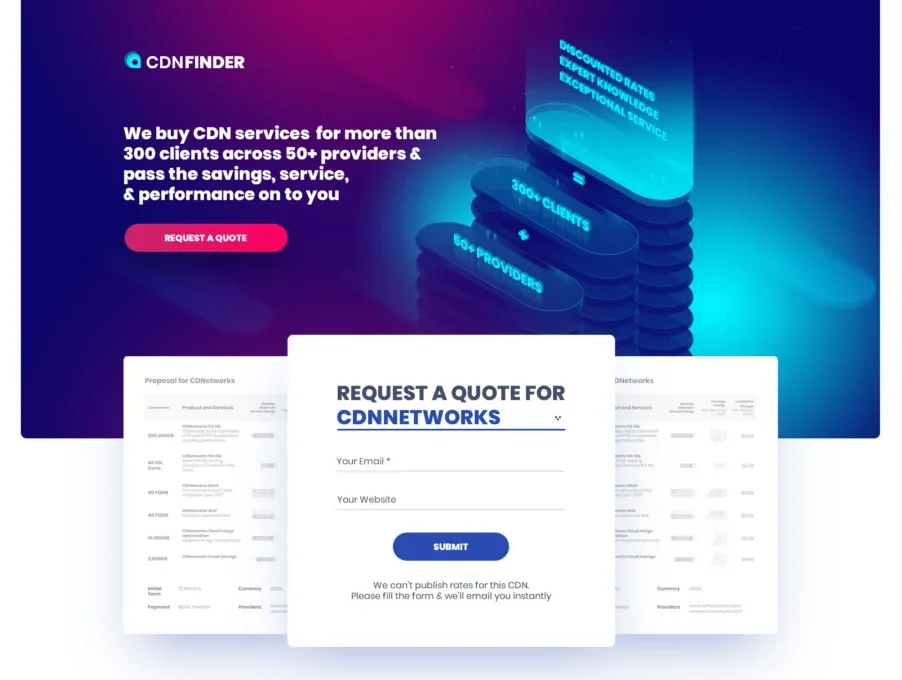
Providers whose prices could not be public needed a page of their own: a request-a-quote page for one specific provider. Its job was to explain why the quote is worth asking for. The headline says CDNfinder buys CDN services for more than 300 clients across 50+ providers and passes the savings, service and performance on. A form asks for an email and a website, and a line under it says the rates for this CDN cannot be published, so fill the form and the quote arrives by email.
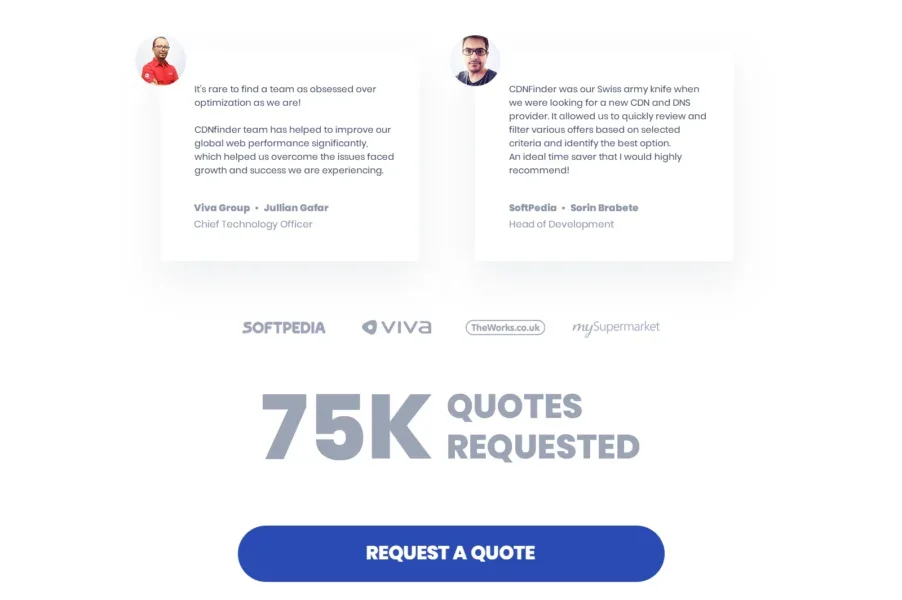
The trust section below it uses two real testimonials, from the CTO of Viva Group and the head of development at Softpedia, a row of logos and a big number. We designed number blocks as a bold figure with two short lines of explanation. Our first ones were placeholders copied from another site, and we marked them as such and asked Bart for real figures. The page shows 75K quotes requested.
A custom illustration usually costs 8 to 15 hours, so we kept the early versions quick and Bart agreed to put the fancier custom work into a second phase. Even so, the header illustration slid past its deadline several times. We sketched the idea as isometric scenes: the best providers drawn with ticks on a checklist, the best one with all of them, and a second scene where every provider has the same ticks but a different price, shown as piles of coins. Bart asked whether it would be too busy with every device in it, and he questioned a Facebook screen, since his customers are technical and the company sells to businesses.
Bart planned to build the quote page in Unbounce. He had applied for its startup plan, and a landing page tool meant no development queue.
Landing Pages and a Semantic Core for a Comparison Site
By May 9 Bart had a list of 15 landing pages, among them CDN for gaming, for ecommerce, for startups, and for the Middle East, Latin America and mainland China. Our question was how anyone would find them. We delivered a first semantic core, sorted by search volume, with cost per click and competition colored green for good and red for too expensive to chase right now. Bart brought his own keyword list from a year earlier: “content delivery network”, “free cdn”, “what is cdn” and so on.
We kept the paid traffic arithmetic simple. If 100 clicks at $5 cost $500, will those clicks bring a $500 deal? If not, test at $1 a click. A previous employer of Bart had burned $5,000 a month on search ads without results, so if he tried it again, he would start with $1,000. SEO was the slower plan: around 50 articles a year, 10 of them evergreen guides and 40 lighter pieces.
What Bart Said About the Direction
Bart planned A/B tests once the new site was live on production. The early reaction was good: he called our first concept “off to a great start”. An outside reviewer Bart showed the homepage to called the top ranking chart “incredibly clear” and liked the call to action at the bottom. Bart told us the comments on the other pages were positive. The contract closed on May 9, 2018, and he sent a new offer the same day.
What went well: the audit gave the whole team data to argue with, the homepage became a tool with filters first, and a client came back with another offer on the day the contract closed.
Tips From This Project
Use these on your own comparison website:
- Ask for analytics and session recordings before anyone draws a layout.
- Say how big the sample is. Thirty-nine events is small, and the heatmap still showed a pattern.
- Check that your header animation does not turn recordings into white screens.
- Google wants a page to load in 3 to 5 seconds at most. Aim for 2.
- Replace 32 feature switches with presets for the two or three most common needs.
- When prices can’t be public, give each card one of three states with one button.
- Check that PSD layers are real vectors before you promise SVG.
Planning a Comparison Website or Marketplace Redesign?
Ask us about your comparison website. Comparison sites and marketplaces break the usual landing page rules, because the visitor has to choose between many things and the business cannot show every price. If that is your page, we will take a free look at your analytics and recordings and tell you what we would change first. You can also see what a project like this costs before you write to us.
Read next
HIPAA-Compliant Website Design: What We Changed on LuxSci’s Homepage. A five-year redesign: calls to action, service naming and a one-field demo form.
Physical Product Landing Page Design: Ö.Wall Case Study (Öopenspace). A launch page for a product with no category, and a budget that overran.
BetterBill: fintech app and landing page design. A service that finds the lowest price, 100+ screen updates.
Beauty & Melody: salon website design. UX/UI and responsive web design for a celebrity salon.